Showing posts with label computers. Show all posts

Tuesday, February 15, 2011

The Server Problem

White-tailed buck & doe   005.jpg
White-tailed spike horn buck and a doe

You have to forgive me for blog posts that jump back and forth in time. We had a huge problem with my new four terabyte server when we moved it from the sun porch to the living room because of the kitchen renovations. John carefully took each component apart. My job was to move each component to the new location with all cables attached. Did I do that? Nope. I detached a couple of cables and the server never worked after that. I was e-mailing Arthur, who designed and built the server for us He couldn’t figure out what the problem was. He couldn’t come here from New Hampshire to fix it because of the weather. Arthur and John did a lot of trouble shooting on the phone. Arthur tried to recreate the problem at home and couldn’t. John tried to mount the drives directly onto my computer without the server and that didn’t work.

Finally about a month ago, we called PC+Med in Newport. A young technician came the next morning. The first question he asked me was if the AC adaptor on the external drive dock was the correct adaptor for the dock. Well, I had no idea! So we all dug through my boxes of cables and equipment and found the proper adaptor. I had attached the wrong AC adaptor! The dock wasn't getting enough power, so the drives couldn't load, and therefore nothing worked. I was very embarrassed and told John and the technician that we would none of us ever tell anybody what I had done. They agreed. But my guilt forced me to do the right thing. Arthur had spent a lot of time and thought trying to solve my server problem and he deserved to know that it was my fault that it wouldn’t work. So I confessed. I only asked Arthur not to laugh at me for what I had done. It really hurt my pride to confess to him. After all, Arthur and I have played with computers together for twenty years and he knows that I know what I’m doing!

Arthur said he couldn’t possibly laugh at me because he has done the same thing himself in the past! This is why I love him. He’s the best!

Anyhow, because the server was down, I couldn't access thousands of photos and had only the most recent photos available for blogging. But now I can go back in time and continue our adventures.

In September, John and I drove to Burlington because I needed new glasses. My glasses were so bad that the lenses kept falling out here and there and anywhere. It got so bad that I only had one eye that worked. So we went to the optometrist and I kicked and screamed the whole way. But nothing awful happened. We actually had a nice day in Burlington. We had lunch out, went window shopping and had a lot of time together.

I finally got bifocals. John talked me into it (and I'm glad he did!). Photography and grocery shopping are much easier now. I can focus the camera and read the labels in the store. I don't come home with the wrong groceries anymore!

As we drove home from Burlington, John spotted these two young deer on Lowell Mountain. We turned around and drove back to take the photos. They were far off at the tree line but my lens caught them. Not caught well, but caught.This was the first spike horn I have ever seen. I guess it is now legal to hunt spike horns and it has always been legal for youth weekend.

White-tailed buck & doe   03.jpg

By the way, click here for the 2011 hunting calendar for Vermont. It’s a pdf file for printing. And click here for Vermont hunting regulations.

_/\_/\_

Sunday, September 26, 2010

More MacHeresy


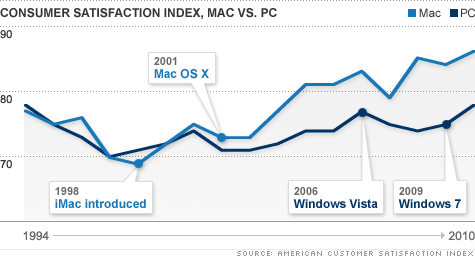
Consumer Satisfaction Index, Mac vs PC

I've always loved Macs. But the iPhone killed my adoration of all things Apple. If I had been able to get an iPhone in Vermont when they were introduced, I probably would have. (It was illegal, yes, illegal, to sell iPhones in Vermont. It was also illegal to go to Boston and bring one back home.) The iPhone frustration got me thinking and I slowly began to suspect that for decades I had willingly participated with Apple's marketing hype. I still enjoy my Macs (we still have and use quite a few), but now I wonder why.

I've never wanted to be one sheep in a herd that blindly and unquestioningly followed a master marketer so that I would buy what I don't need. But that's just what I did when I bought and desired Apple products. The pride of owning glittery computers that were admired by others was just what Apple wanted me to feel. I believed the marketing hype, I fell for the price decoys, high reference prices, and Mac bundling to rationalize spending $3,000 for a laptop computer. But Apple is too exclusive for me now; I want a more inclusive and less rancorous computer culture. Read How Apple plays the pricing game Creative strategies prompt consumers to buy, buy, buy. Now it's the Mac OS X operating system I love, not the machine. So I doubt that I'll ever buy another Apple product unless it is the OS (read Mac OS on a Dell? Dell Favors, Apple Opposes and read more about the Hackintosh here).

The components that Apple uses in its MacPro line are not the top of the line components that I had always assumed were used. Upgrades to bigger and better components are overpriced. I always thought that the components used by Apple were the highest quality, but they aren't. I can buy (and we have, recently) bigger, better and faster components to upgrade my PC system. You can't do this with Apple. (source: http://thenextweb.com/apple/files/2010/09/mac01.jpg). Click the image on the left to read the details in a new window.

Remember the old windoze jokes (if you are, or were, a MacAddict you do)? I'm not laughing anymore. Windows 7 is good (not spectacular) and Microsoft is not the evil empire. Read Why does everyone hate Microsoft?

My own experiences with Windows and Dell have been very positive. I am able to do anything I wanted to do on my Macs — and more. I can run Priime95 now (also GIMP, Electric Sheep and Apophysis). My photographs are not altered to Mac-only formats.

Last week, Arthur upgraded our two PCs with a 4 terabyte server. We were running out of room (because of the photographs) and having response problems. So for $500, Arthur configured a server for us and installed it. That is 12.5¢ a gigabyte. With operating system software. I couldn't do this with a MacBook or MacPro.

And to make this whole new PC experience better, I got new eyes! Finally after many years of ignoring my growing vision problems, I had to get new glasses. The lens fell out of my readers and I couldn't find it. Now I have progressive bifocal lenses. It took a week for me to be comfortable with them, but now I love them. Of course, I wonder why I didn't do this years ago! Do yourself a favor — get a new, cheap PC and new glasses and enjoy the hundreds of dollars that you can now spend on — well, whatever you want. Like groceries, firewood, or a savings account!
_/\_/\_

Tuesday, September 07, 2010

Ask Bob Rankin: How Can I Check for Hard Drive Damage?

Click to read more from Bob Rankin
If, like me, you are a MacHeretic and are still learning the PC operating system, I found a valuable resource for help:
From Ask Bob Rankin:
Every operating system can check a hard drive for bad sectors. In versions of Windows prior to XP, the DOS utility CHKDSK was used at the command line level. Later versions of Windows use this procedure:
  • Open the Start Menu and click on My Computer
  • Right-click on the icon representing the hard drive in question and select Properties
  • On the Tools tab, click the Check Now button under "Error-checking"
  • On the following popup window, check the box labeled "automatically fix errors" and "scan for and attempt to repair bad sectors"
  • Click OK
You will have to restart Windows because the error-checking utility cannot run while Windows is running. The tests and repairs will take a significant amount of time on a large hard drive; go to lunch or happy hour. When the tests for hard drive damage end, Windows will restart automatically. A report will be available after the error-checker does its job.
Click on the image above and subscribe to Rankin's e-mail list for more tips and information. Click the link "Ask Bob Rankin" to read this article in full. There are instructions for Macs there. Perhaps I'm not a MacHeretic as much as bi-platform girl.
_/\_/\_