|
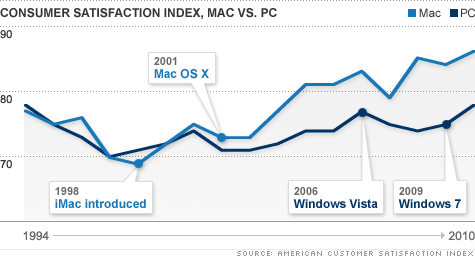
| Consumer Satisfaction Index, Mac vs PC |
I've always loved Macs. But the iPhone killed my adoration of all things Apple. If I had been able to get an iPhone in Vermont when they were introduced, I probably would have. (It was illegal, yes, illegal, to sell iPhones in Vermont. It was also illegal to go to Boston and bring one back home.) The iPhone frustration got me thinking and I slowly began to suspect that for decades I had willingly participated with Apple's marketing hype. I still enjoy my Macs (we still have and use quite a few), but now I wonder why.
I've never wanted to be one sheep in a herd that blindly and unquestioningly followed a master marketer so that I would buy what I don't need. But that's just what I did when I bought and desired Apple products. The pride of owning glittery computers that were admired by others was just what Apple wanted me to feel. I believed the marketing hype, I fell for the price decoys, high reference prices, and Mac bundling to rationalize spending $3,000 for a laptop computer. But Apple is too exclusive for me now; I want a more inclusive and less rancorous computer culture. Read How Apple plays the pricing game Creative strategies prompt consumers to buy, buy, buy. Now it's the Mac OS X operating system I love, not the machine. So I doubt that I'll ever buy another Apple product unless it is the OS (read Mac OS on a Dell? Dell Favors, Apple Opposes and read more about the Hackintosh here).

Remember the old windoze jokes (if you are, or were, a MacAddict you do)? I'm not laughing anymore. Windows 7 is good (not spectacular) and Microsoft is not the evil empire. Read Why does everyone hate Microsoft?
My own experiences with Windows and Dell have been very positive. I am able to do anything I wanted to do on my Macs — and more. I can run Priime95 now (also GIMP, Electric Sheep and Apophysis). My photographs are not altered to Mac-only formats.
Last week, Arthur upgraded our two PCs with a 4 terabyte server. We were running out of room (because of the photographs) and having response problems. So for $500, Arthur configured a server for us and installed it. That is 12.5¢ a gigabyte. With operating system software. I couldn't do this with a MacBook or MacPro.
And to make this whole new PC experience better, I got new eyes! Finally after many years of ignoring my growing vision problems, I had to get new glasses. The lens fell out of my readers and I couldn't find it. Now I have progressive bifocal lenses. It took a week for me to be comfortable with them, but now I love them. Of course, I wonder why I didn't do this years ago! Do yourself a favor — get a new, cheap PC and new glasses and enjoy the hundreds of dollars that you can now spend on — well, whatever you want. Like groceries, firewood, or a savings account!
_/\_/\_